
Earlier this year, my parents bought a John Deere Ground Force Tractor and Trailer for my son Theodore and the other grandkids to play with at the cabin. For some inexplicable reason, in 2026, this tractor includes an FM radio (2xAA lithium batteries – not included). Putting the batteries in and turning it on, hits you with a blast of static noise, since Norway has transitioned most FM to DAB since 2017.

I could simply remove the batteries and leave it as a useless part, but

  1. It’s one of the selling points of the tractor
  2. Dials and buttons are fun to use, and even more so if they actually do something!
    • I also think it’s a good learning that when you press stuff something happens
  3. It would be a lot more fun if it worked, and I do enjoy a pointless project where I might learn a thing or two

This led me to the thought: Would it be possible to broadcast a local FM signal and make my own radio channel?

Down the rabbit hole

After some quick searching I ended up finding fm_transmitter, a library to use the Raspberry Pi as a FM transmitter. I dug out a Raspberry Pi Zero 2 WH I had lying in a drawer, and quickly installed Raspberry Pi OS Lite (32-bit), and followed the installation instructions on the repository.

Next I grabbed a Dupont wire, connected it to GPIO4 on the Pi, and extended it by connecting a Wago clip with another wire to get a length of ~84.3cm, which is the recommended length for broadcasting on 89.0MHz. More details and an “Antenna Calculator” can be found on this page describing the full process in more detail.

Moment of truth, I ran the test command from the repository with an FM radio I had tuned to 89.0, and lo and behold the static changed into music!
I honestly couldn’t believe how easy it was to get up and running, and the whole thing I was expecting to spend multiple summer evenings on, took a total of maybe 30 minutes.

Creating a continuous feed

Now I was able to take any wav files that I had and broadcast them, and it would play the song from beginning to end, but then the process would terminate and the feed would stop, and go back to static. What I wanted was a folder songs/ which I could put a bunch of mp3s into, and it would just randomly play all of them over and over.

Play mp3s instead of wavs

fm_transmitter documents on their website how to use SoX to convert an mp3 and get it to play like this

1
sox example.mp3 -r 22050 -c 1 -b 16 -t wav - | sudo ./fm_transmitter -f 89.0 -

Unfortunately, I could not get this to work, even after installing the required libsox-fmt-mp3. Whenever I would pass it an mp3, it would spit back

sox FAIL formats: no handler for file extension `mp3'

I spent some time debugging and trying to understand what the issue was, but could not make it work regardless of what I tried. Eventually I figured out that the sox I was getting via apt was “compiled without libltdl dynamic-module support”, and therefore didn’t load any of the libsox-fmt-* files. I tried the workarounds using ffmpeg instead, but really didn’t feel like having to reencode each file to be able to play it. Just having a folder where I could drop an mp3 and play felt much easier.

Enter sox_ng, a “hard fork of sox-14.4.2 aiming to sanitize SoX”. I followed the steps for compiling it from source, which gave me a sox_ng binary, and this one accepted mp3s!

Non-stop music

With mp3s playing the next step was to create something which allowed me to just continuously loop through all files in my directory, and play them back to back without interruption. Using Claude, and quite a few back-and-forths, I created a bash script which allowed me to do just that. Now I actually had a local broadcast which played the songs I wanted, and I could easily add/remove songs as I needed.

Becoming a radio DJ

Since the initial setup and wiring went much faster than I had expected, I had some extra time to dive further into the project, and what does every radio station need? Jingles! Having used ElevenLabs in the past, I figured this could be a fun way to create some short jingles that would integrate nicely with the music.

I spent a bit of time coming up with a name for the station, then testing a few different voices and getting pronunciation right. This turned out to be more challenging since I was mixing English and Norwegian pronunciations in the same jingle. Thankfully there is native support for IPA pronunciation which made it possible.

Then Claude helped me change the script to support playing jingles, and it now plays a random jingle after every song.

Jingles

Here are some examples of jingles I created

“You’re listening to Radio Chateau HĂĄa”

“You’re still listening to Radio Chateau HĂĄa”

“Psst, here’s a message for Theodore: Mommy loves you! Radio Chateau HĂĄa”

Home Assistant

Now I could just leave this running 24/7, but since we’re not there most of the time, and the tractor isn’t always used, I figured it would make sense to have a way to start/stop the broadcast. With a robust Home Assistant setup already in place, this was a natural place to add it.
Claude helped me create a simple fm_mqtt_control.sh script which just listens and publishes state changes to MQTT, which is connected to Home Assistant as an mqtt switch:

 1
 2
 3
 4
 5
 6
 7
 8
 9
10
mqtt:
  switch:
    - name: "Pirate FM Radio"
      unique_id: pirate_fm_radio
      command_topic: "home/radio/set"
      state_topic: "home/radio/state"
      payload_on: "ON"
      payload_off: "OFF"
      qos: 1
      retain: false

This gives a button I can use to start/stop the broadcast without needing to touch the Pi, and also lets me automatically shut down the broadcast when leaving, and enable it when the tractor is going to be used.
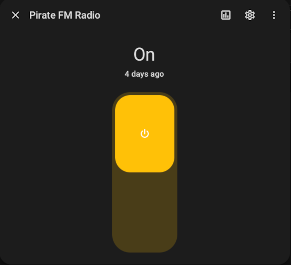
screenshot of home assistant radio toggle

Finally I set up some systemd files for fm-radio.service and fm-radio-mqtt.service to ensure broadcast and MQTT listener run after reboot or crash.

Conclusion

All in all this turned out to be a lot easier than I was expecting, but it was quite fun and nostalgic to hear the music and jingles I selected be played on an FM radio!

Further improvements to look into would be slightly extending the range, since today it doesn’t fully cover the whole property, and when driving to the edges it abruptly cuts off. But then again, creates a bit of a “virtual boundary” so the kids don’t set off on too big of an adventure…

Resources

fm_shuffle.sh
  1
  2
  3
  4
  5
  6
  7
  8
  9
 10
 11
 12
 13
 14
 15
 16
 17
 18
 19
 20
 21
 22
 23
 24
 25
 26
 27
 28
 29
 30
 31
 32
 33
 34
 35
 36
 37
 38
 39
 40
 41
 42
 43
 44
 45
 46
 47
 48
 49
 50
 51
 52
 53
 54
 55
 56
 57
 58
 59
 60
 61
 62
 63
 64
 65
 66
 67
 68
 69
 70
 71
 72
 73
 74
 75
 76
 77
 78
 79
 80
 81
 82
 83
 84
 85
 86
 87
 88
 89
 90
 91
 92
 93
 94
 95
 96
 97
 98
 99
100
101
102
103
104
105
106
107
108
109
110
111
112
#!/bin/bash
# fm_shuffle.sh — shuffle mp3s from a folder on loop via fm_transmitter
#
# The transmitter runs once, reading from a FIFO that we hold open, so the
# carrier stays up between songs. Each song is decoded by sox in the
# foreground and streamed into the FIFO; when sox returns, the song is done.

FREQ="89.0"
MP3_DIR="/home/pi/fm_transmitter/songs"
JINGLE_DIR="/home/pi/fm_transmitter/jingles"
TRANSMITTER="/home/pi/fm_transmitter/fm_transmitter"
FIFO="/tmp/fm_shuffle_pipe"

if [ "$EUID" -ne 0 ]; then
  echo "Run this with sudo — fm_transmitter needs root for GPIO access."
  exit 1
fi

if ! command -v sox_ng >/dev/null; then
  echo "sox_ng not found in PATH."
  exit 1
fi

if [ ! -x "$TRANSMITTER" ]; then
  echo "Transmitter binary not found or not executable: $TRANSMITTER"
  exit 1
fi

shopt -s nullglob

tx_pid=""

cleanup() {
  trap - INT TERM EXIT
  exec 3>&- 2>/dev/null
  if [ -n "$tx_pid" ] && kill -0 "$tx_pid" 2>/dev/null; then
    kill -INT "$tx_pid" 2>/dev/null
    for _ in $(seq 1 10); do
      kill -0 "$tx_pid" 2>/dev/null || break
      sleep 0.2
    done
    kill -9 "$tx_pid" 2>/dev/null
    wait "$tx_pid" 2>/dev/null
  fi
  rm -f "$FIFO"
  exit
}
trap cleanup INT TERM EXIT

start_tx() {
  "$TRANSMITTER" -f "$FREQ" - < "$FIFO" &
  tx_pid=$!
  # Hold the FIFO open for writing so the transmitter never sees EOF
  # between songs. Blocks until the transmitter has opened its end.
  exec 3> "$FIFO"
  # Send a single WAV header declaring an "infinite" (0xFFFFFFFF) data size,
  # so the transmitter never thinks the stream is finished. Songs are then
  # streamed as raw PCM matching this header: 22050 Hz, mono, 16-bit signed.
  printf 'RIFF\xff\xff\xff\xffWAVEfmt \x10\x00\x00\x00\x01\x00\x01\x00\x22\x56\x00\x00\x44\xac\x00\x00\x02\x00\x10\x00data\xff\xff\xff\xff' >&3
}

# Decode a file to the raw PCM format declared in the stream header.
# Writes to the held-open fd 3 rather than reopening the FIFO: if the
# transmitter dies mid-song, sox fails fast with EPIPE, whereas a fresh
# open() of the FIFO would block forever waiting for a reader.
play() {
  sox_ng "$1" -r 22050 -c 1 -b 16 -e signed-integer -t raw - >&3
}

ensure_tx() {
  kill -0 "$tx_pid" 2>/dev/null && return
  echo "Transmitter died, restarting..."
  exec 3>&-
  wait "$tx_pid" 2>/dev/null
  sleep 1  # don't spin hot if the transmitter is crashing on startup
  start_tx
}

# Play a file, restarting the transmitter and retrying once (from the top of
# the file) if it died before or during playback.
play_song() {
  ensure_tx
  play "$1" && return
  echo "Playback failed: $(basename "$1")"
  ensure_tx
  play "$1" || echo "Skipping: $(basename "$1")"
}

[ -p "$FIFO" ] || mkfifo "$FIFO"
start_tx

while true; do
  files=("$MP3_DIR"/*.mp3)
  jingles=("$JINGLE_DIR"/*.mp3)
  if [ ${#files[@]} -eq 0 ]; then
    echo "No .mp3 files found in $MP3_DIR, retrying in 10s..."
    sleep 10
    continue
  fi

  mapfile -t shuffled < <(shuf -e -- "${files[@]}")
  for song in "${shuffled[@]}"; do
    echo "Now playing: $(basename "$song")"
    play_song "$song"

    if [ ${#jingles[@]} -gt 0 ]; then
      jingle=$(shuf -n1 -e -- "${jingles[@]}")
      echo "Jingle: $(basename "$jingle")"
      play_song "$jingle"
    fi
  done
done
fm-radio.service
 1
 2
 3
 4
 5
 6
 7
 8
 9
10
11
12
13
14
15
16
17
18
[Unit]
Description=FM Pirate Radio Shuffle

[Service]
Type=simple
ExecStart=/home/pi/fm_shuffle.sh
# SIGINT to the whole cgroup: sox dies instantly (bash can't run its trap
# while a foreground child runs), and fm_transmitter's own SIGINT handler
# shuts down the GPIO carrier cleanly.
KillMode=control-group
KillSignal=SIGINT
TimeoutStopSec=10
Restart=on-failure
RestartSec=5
User=root

[Install]
WantedBy=multi-user.target
fm_mqtt_control.sh
 1
 2
 3
 4
 5
 6
 7
 8
 9
10
11
12
13
14
15
16
17
18
19
20
21
22
23
24
25
26
27
28
29
30
31
32
33
34
35
36
37
#!/bin/bash
# fm_mqtt_control.sh — start/stop the fm-radio service based on MQTT messages
#
# Listens on $TOPIC_CMD for ON/OFF (also accepts START/STOP/1/0, any case)
# and publishes the resulting state to $TOPIC_STATE (retained) so dashboards
# like Home Assistant can reflect it.

BROKER="<MQTT_BROKER_ADDRESS>"
PORT="<MQTT_BROKER_PORT>"
TOPIC_CMD="home/radio/set"
TOPIC_STATE="home/radio/state"
SERVICE="fm-radio.service"
AUTH=(-u "<MQTT_USER>" -P "<MQTT_PASSWORD>")

publish_state() {
  mosquitto_pub -h "$BROKER" -p "$PORT" "${AUTH[@]}" -t "$TOPIC_STATE" -r -m "$1"
}

mosquitto_sub -h "$BROKER" -p "$PORT" "${AUTH[@]}" -t "$TOPIC_CMD" | while read -r msg; do
  case "${msg^^}" in
    ON|START|1)
      echo "MQTT: starting $SERVICE"
      systemctl start "$SERVICE" && publish_state "ON"
      ;;
    OFF|STOP|0)
      echo "MQTT: stopping $SERVICE"
      systemctl stop "$SERVICE" && publish_state "OFF"
      ;;
    *)
      echo "MQTT: ignoring unknown payload: $msg"
      ;;
  esac
done

# mosquitto_sub exiting means the broker connection dropped;
# exit nonzero so systemd restarts us and we reconnect.
exit 1
fm-radio-mqtt.service
 1
 2
 3
 4
 5
 6
 7
 8
 9
10
11
12
13
14
15
[Unit]
Description=MQTT start/stop control for FM Pirate Radio
Wants=network-online.target
After=network-online.target

[Service]
Type=simple
ExecStart=/home/pi/fm_mqtt_control.sh
# Reconnect forever if the broker goes away or isn't up yet at boot.
Restart=always
RestartSec=5
User=root

[Install]
WantedBy=multi-user.target